What’s new in Fundlify.
Every feature launch, Shopify Polaris 2.0 refinement, and merchant workflow upgrade—organized chronologically by release date directly from our in-app Help Center.
2026
23 releases
Oct 29
2026
Latest release
We’ve just rolled out a major upgrade to Fundlify — redesigning the entire app experience to match Shopify’s newest design system, adding…
We’ve just rolled out a major upgrade to Fundlify — redesigning the entire app experience to match Shopify’s newest design system, adding…
We’ve just rolled out a major upgrade to Fundlify — redesigning the entire app experience to match Shopify’s newest design system, adding day-one support for Shopify’s brand-new Canvas themes, and giving you more ways to launch and hit your funding goals.
Here is what’s new in your dashboard:
1. Redesigned Interface Built on Shopify Polaris 2.0
- What’s new: Every screen in Fundlify — from your Dashboard, Campaign Editor, and Design Studio to Orders, Affiliates, and Notifications — has been rebuilt on Shopify’s latest Polaris 2.0 interface, complete with inline reward title editing and smoother live analytics charts.
- How it helps you: Fundlify now feels 100% native inside the latest Shopify Admin, making it faster, cleaner, and much easier to set up campaigns, edit rewards on the fly, and monitor results without visual clutter.
2. Day-One Support for Shopify Canvas & Next-Gen Themes
- What’s new: Fundlify now works seamlessly with Shopify’s newest AI-powered Canvas themes, alongside Horizon and all Online Store 2.0 themes — with automatic campaign/collection pages, 1-click Canvas activation right from your Dashboard, and automatic product-page widgets.
- How it helps you: Whether you build a brand-new storefront in Shopify Canvas with Sidekick or switch themes later, your campaign pages, collection hub, and product pre-order widgets work in one click with zero theme-code headaches.
3. Target Quantity (Units) Campaign Goals
- What’s new: You can now run Pre-Launch and Pre-Order campaigns based on units reserved or sold (for example, 200 units) in addition to currency revenue goals, tracked live across your storefront progress bar, Design Studio, and Demand Forecast.
- How it helps you: Ideal for factory minimum order quantities (MOQs) and limited-edition drops — you and your backers can rally around the exact number of units needed to bring a product into production.
4. All-New 27-Guide In-App Knowledge Base
- What’s new: Our built-in Help Center drawer now includes 27 refreshed, step-by-step guides covering campaign strategy, Direct Checkout vs. Draft Orders, Affiliates, and theme setup.
- How it helps you: Get instant, practical answers right inside Fundlify without leaving the page you’re working on.
5. Uninterrupted Editing Sessions & 50 MB Studio Uploads
- What’s new: Upgraded Shopify session handling and background token refresh across the app, paired with support for high-resolution campaign images up to 50 MB with automatic smart compression.
- How it helps you: Long sessions in the Campaign Editor or Design Studio stay rock-solid without unexpected sign-outs, and you can upload crisp studio photos directly without resizing them first.
Everything above is ready for your next launch. As always, reach out anytime with feedback or feature ideas — we’re building Fundlify with you.
Oct 27
2026
Today we rolled out a major update to Fundlify focused on making order collection, inventory control, and day-to-day campaign management…
Today we rolled out a major update to Fundlify focused on making order collection, inventory control, and day-to-day campaign management…
Today we rolled out a major update to Fundlify focused on making order collection, inventory control, and day-to-day campaign management much faster and easier for you.
We built this update around real bottlenecks merchants run into when transitioning from Pre-Launch to Pre-Order and collecting payments at the end of a campaign. Here is everything new in your dashboard today:
1. Bulk Checkout Invoice Sending for Draft Orders
- What’s new: Generating Draft Orders is now a clear 2-step flow. After generating your Shopify Draft Orders, you can send (or resend) official Shopify checkout invoices to all your backers in bulk—complete with an optional custom email subject and personal message.
- Why we built it & how it helps you: Shopify doesn’t automatically email customers when a draft order is created, which meant having to open draft orders one by one in Shopify Admin to send payment links. Now you can review your drafts peacefully first, then email secure checkout links to dozens or hundreds of backers in a couple of clicks right inside Fundlify.
2. Smarter Draft Order Controls & Fraud Protection
- What’s new: When generating draft orders, you can now skip unverified or suspicious/disposable-email leads with one checkbox, mark drafts as tax-exempt when needed, and rely on locked campaign pricing across currencies (including converted Pre-Launch reservations and add-ons). Cancelled orders are also excluded automatically.
- Why we built it & how it helps you: You shouldn't waste time—or pay platform fees—generating drafts for fake, unverified, or cancelled pledges, and your backers will always see the exact campaign price they were promised at checkout.
3. Release Unclaimed Reservations & Restore Stock Instantly
- What’s new: You can now release individual or bulk unclaimed Pre-Launch reservations directly from your Reservations tab, with the option to either notify those customers by email or release the stock silently.
- Why we built it & how it helps you: Previously, if someone reserved a limited-edition item during Pre-Launch but never completed their pre-order, that stock stayed locked. Now, releasing unclaimed reservations immediately frees up those units and syncs your available inventory back to Shopify so ready-to-buy customers can grab them.
4. Cumulative Per-Customer Purchase Limits
- What’s new: Purchase limits on rewards and add-ons are now enforced cumulatively per customer email across both Pre-Launch reservations and Pre-Orders (Direct Checkout and Draft Orders).
- Why we built it & how it helps you: Previously, a shopper could get around a quantity cap by placing multiple separate orders. Now Fundlify checks their active campaign history automatically so single buyers can’t hoard limited tiers, keeping your launch fair for your whole community.
5. Quick Actions Right from "My Campaigns"
- What’s new: Each row in My Campaigns now has a quick-actions menu (
•••) to jump straight to View Orders, End Campaign, or Delete Campaign without opening the campaign editor first. - Why we built it & how it helps you: Managing multiple campaigns is faster from a single screen, with clear confirmation summaries so you never end or delete anything by accident.
6. Smoother High-Res Media Uploads & Variant Pricing Polish
- What’s new: Faster, smoother cropping and compression for large campaign images (up to 50 MB), plus dynamic Pre-Launch and Pre-Order variant price and
% OFFupdates on your storefront widget as shoppers switch options. - Why we built it & how it helps you: Uploading studio-quality product photos won't slow down your browser, and shoppers always see the exact price and savings for whichever variant they pick.
Everything above is live in your account right now. As always, if you have feedback or feature requests, reach out anytime—we're building this with you.
Oct 22
2026
🚀 Introducing Fundlify Affiliates & Milestone Rewards: Turn Every Backer Into Your Growth Engine
🚀 Introducing Fundlify Affiliates & Milestone Rewards: Turn Every Backer Into Your Growth Engine
🚀 Introducing Fundlify Affiliates & Milestone Rewards: Turn Every Backer Into Your Growth Engine
Turn Every Backer Into a Promoter — Without Paying a Single Dollar in Ad Spend or Cash Commissions
Reward your biggest fans with free products from your campaign when their friends back you. Zero cash payouts, zero upfront risk, and 100% built into your campaign page.
Why We Built This (And Why It Changes Everything)
Running ads for a product launch gets more expensive every year. Yet your most powerful marketers are already on your page: the backers and fans who love what you’re launching.
Traditional affiliate apps were built for standard online stores — they require complicated sign-up portals, tax forms, PayPal payouts, and eat straight into your cash margin.
We built Fundlify Affiliates & Milestone Rewards specifically for product launches, pre-orders, and crowdfunding campaigns. Instead of paying cash commissions, you reward advocates with Milestone Product Tiers from your own campaign.
🌟 Main Benefits for Your Store
- Grow Sales Without Upfront Ad Spend Every visitor and backer can become an ambassador in seconds, bringing their friends, community, and followers directly to your campaign.
- Protect Your Cash Flow (Reward With Products, Not Cash) Instead of giving away 20% of your revenue in cash commissions, you reward partners with your own products at manufacturing cost once they hit a referral goal (for example: Refer 1 friend = Free Cap, Refer 3 friends = Travel Kit, Refer 5 friends = Free Backpack).
- Only Confirmed, Paid Orders Count You never reward fake leads or unpaid reservations. A referral only counts toward a partner's milestone once their friend's order is confirmed and paid. If an order is ever cancelled or refunded, the progress adjusts automatically.
- 1-Click Reward Fulfillment When Your Campaign Ends No spreadsheets, no manual math. When your campaign concludes, Fundlify shows you the exact highest milestone reward each partner unlocked — and lets you create their $0.00 Free Reward Order in Shopify with a single click.
💡 What Makes Fundlify’s Affiliate Module Truly Unique & Innovative?
- Gamified Milestone Tiers (Instead of Boring Cash Links): Advocates see a live, visual progress bar showing how close they are to unlocking their next free product reward — creating the same viral excitement that made legendary launches like Harry’s and Robinhood explode.
- Zero-Friction, Passwordless Experience Right on Your Page: Your backers never leave your campaign page or create a password. They simply click "Refer & Earn", enter their email, confirm a quick 6-digit code, and their live partner dashboard, unique share link, and milestone tracker open instantly in a sleek pop-up.
- Seamless Pre-Launch to Pre-Order Attribution: If a friend reserves a spot during your Pre-Launch phase using a referral link and comes back weeks later to complete their Pre-Order purchase, Fundlify automatically remembers and credits the referring partner.
- Built-In Anti-Cheat Protection: Our smart verification system automatically prevents self-referrals — if a partner tries to buy through their own referral link (even using email alias tricks), their purchase still goes through normally for your store, but it won't falsely count toward their free affiliate reward.
- Full Design Studio Control: Choose where the "Refer & Earn" trigger lives (next to the "Choose Your Reward" button, under the creator profile, as a feature banner under Campaign Updates, or both) and choose between Clean Light, Obsidian Glow, or Frosted Carbon Glass pop-up themes.
📍 Where to Find It & How to Turn It On (In Under 60 Seconds)
- Manage All Campaigns in One Place: In your left-hand Fundlify navigation menu inside Shopify Admin, click Affiliates (
/app/affiliates) to see all your campaigns, active partners, referral revenue, and unlocked rewards at a glance. - Set Up Your Milestone Rewards: Go to My Campaigns → Select Your Campaign → Click "Affiliates" (or open a campaign from the Affiliates menu). Turn on the program and add your Milestone Reward Tiers (choose how many referrals are needed and pick the free product + quantity for each tier).
- Customize the Look & Placement: Open Design Studio for your campaign and click the Affiliates section on the right sidebar to customize your button colors, placement, and pop-up theme.
Aug 11
2026
⚡ What's New & Improved:
⚡ What's New & Improved:
⚡ What's New & Improved:
- ⚡ 10x Faster Dashboard Navigation: Instant tab switching between campaigns, analytics, and settings inside your Shopify Admin.
- 🌐 Lightning-Fast Storefront Widgets: Edge CDN caching enabled on pre-order widgets, ensuring instant load times during high-traffic product launches.
- 🛡️ Enhanced System Health & Uptime: Infrastructure optimizations to ensure maximum reliability and real-time responsiveness.
- 📊 Optimized Analytics: Real-time accuracy for campaign order counts, revenue tracking, and visitor metrics.
Everything is active on your store right now—no action required on your part. Enjoy the faster speed!
June 4
2026
Order Cancellation Flow
Order Cancellation Flow
Order Cancellation Flow
We've rolled out a comprehensive cancellation system that gives both merchants and customers full control and transparency over cancellations.
🔔 Cancellation Email Notifications
Customers now receive an automatic confirmation email when their reservation or pre-order is cancelled. No more wondering "did my cancellation go through?" — they'll know instantly.
- Reservation cancellation — Sent immediately when a pre-launch reservation is cancelled
- Pre-order cancellation — Sent when a pre-order cancellation is processed
Both emails include the campaign details and a link back to the campaign page.
✏️ Customizable Cancellation Templates
Merchants can now fully customize what their cancellation emails look like — just like every other notification in Fundlify.
- Navigate to Notifications in your Fundlify dashboard
- You'll find two new templates:
- Pre-launch cancellation confirmation (under Pre-Launch Phase)
- Pre-order cancellation notification (under Crowdfunding Phase)
- Edit the subject line, header, message body, and button text
- Preview and send test emails before going live
🏷️ Cancellation Status Badges
At a glance, merchants can now see which orders have been cancelled or have pending cancellation requests — right in their order lists.
- "Cancelled" badge (red) — The order/reservation has been fully cancelled
- "Cancellation Requested" badge (red) — The customer has requested cancellation and it's awaiting merchant review (direct checkout orders)
These badges appear in the Reservations list, Pre-Orders list, and Draft Orders list.
🌍 Multi-Language Support
The entire cancellation experience is now available in 15 languages:
Arabic, Chinese, Dutch, English, French, German, Italian, Japanese, Korean, Polish, Portuguese, Russian, Spanish, Swedish, and Turkish.
Merchants can customize the translations for all cancellation-related text through the Campaign Language Selector — including the cancellation confirmation page, status messages, and email content.
📧 Improved Cancel Page
We've refined the customer-facing cancellation page:
- The store name now displays the actual store name instead of the technical Shopify domain
- The success message for direct checkout cancellations now reads: "Your cancellation request has been submitted and it will be attended to shortly" — setting the right expectation
May 21
2026
We’ve rolled out a few important updates and stability improvements to your Fundlify dashboard
We’ve rolled out a few important updates and stability improvements to your Fundlify dashboard
We’ve rolled out a few important updates and stability improvements to your Fundlify dashboard
Variant Title Reconciliation: Adding or rearranging size variants (such as S or custom sizes like XXXL) is now fully aligned with Shopify. Internal mappings reconcile directly by name, ensuring your variant options, pricing, and stock levels remain perfectly synchronized without any shifts.
Email Address Privacy Control:
Your settings are now fully respected! If you uncheck "Include address in footer" under Notification Settings, your private billing or store street address will be completely hidden across all 6 customer-facing transactional emails, keeping only your business name visible.
Direct Checkout Settings Interface Cleanup:
The settings page for pure Direct Checkout campaigns is now cleaner—unnecessary pre-launch reservation notifications are automatically hidden when no reservation phase exists.
In your email customizer, the {{ reservation_magic_link }} variable now renders as a stylized preview button instead of a raw text string, letting you see exactly what your backers will receive.
May 12
2026
Fixed campaign page centering - it was off by 4px!
Fixed campaign page centering - it was off by 4px!
- Fixed campaign page centering - it was off by 4px!
April 18
2026
Multi-Currency Support
Multi-Currency Support

Multi-Currency Support
Your customers now see prices in their own local currency — SAR, USD, GBP, or whatever they shop in. Fundlify automatically converts campaign prices using Shopify Markets, so international backers always know exactly what they're paying.
Design Studio
A visual editor that lets you customize your campaign page's look and feel right from the Fundlify dashboard. Adjust colors, fonts, layout, spacing, and more — without touching a single line of code. What you see is what your customers get.
Granular Layout Controls
Fine-tune your campaign layout with independent padding controls for top, right, bottom, and left — across desktop, tablet, and mobile. Your campaign, your pixel-perfect layout.
Campaigns Collection Page
Display all your active campaigns on a single page with a beautiful grid layout. Perfect for stores running multiple campaigns — give your customers a one-stop overview of everything you're launching.
Embed Anywhere
Embed your campaign on any external website — Framer, Webflow, WordPress, you name it. Just copy the generated embed code and paste it. Choose between a contained box or a full-page layout, and customize the background, border radius, and size.
Branded Direct Links
Every campaign gets a standalone branded page you can share on social media, emails, or ads. No Shopify store login required — anyone with the link can browse and back your campaign.
Email Verification for Pre-Orders
For draft order campaigns, backers now verify their email before their pre-order is confirmed. This ensures every order has a real person behind it and dramatically reduces spam and fake orders.
Add-On Products
Let backers add extra items to their pledge — like accessories, upgrades, or limited-edition extras. Add-ons are displayed alongside the main reward with full inventory tracking.
Real-Time Inventory Tracking
Every variant and add-on has live inventory counts that update in real time as orders come in. When something sells out, customers see it immediately — no overselling.
Demand Forecast & Analytics
A built-in Demand Forecast dashboard that shows you campaign performance trends, daily order velocity, and projected outcomes. Make data-driven decisions about your product launches.
Campaign Updates (Announcements)
Post live updates directly on your campaign page — share milestones, production progress, or thank-you messages. Pin important updates so they always appear at the top.
Multi-Language Support
Your campaigns can now speak your customers' language. Fundlify supports multiple languages so you can reach a global audience with localized campaign content.
Reliable & Secure Checkout
We've hardened the entire checkout flow with multiple layers of validation, smart error handling, and automatic retry logic. Whether your campaign goes viral or gets steady traffic, every checkout completes reliably.
Fully Responsive Design
Every campaign page is optimized for mobile, tablet, and desktop out of the box. Your backers get a beautiful experience no matter what device they're on.
Platform Safety & Compliance
Fundlify enforces a strict Acceptable Use Policy to protect merchants, backers, and the platform. Every campaign is screened against prohibited categories to keep the ecosystem safe for everyone.
April 12
2026
🚀 Your campaign on Shopify, and everywhere else your brand lives.
🚀 Your campaign on Shopify, and everywhere else your brand lives.
🚀 Your campaign on Shopify, and everywhere else your brand lives.
Your Fundlify campaign now runs on your Shopify store, your WordPress blog, your Framer landing page, and anywhere else — all at the same time.
The big idea
Imagine your campaign page running on your Shopify store, embedded on a Framer landing page, live on a WordPress blog post, featured on a partner's website, and linked in every email you send — all simultaneously, all identical, all driving backers to the same campaign.
That's what Branded Campaign URLs unlock.
Every Fundlify campaign now gets its own clean, shareable, branded link:
app.fundlify.com/c/your-brand/your-campaign
Paste it anywhere. Embed it on any platform. Your campaign shows up — full experience, same design, real checkout — as if it was built natively for that page.
Why this is a game-changer
Your campaign reaches people where they already are
Your Shopify store is one channel. But your audience is on your blog, your social media, your partner sites, your landing pages. Now you can meet them there. Drop your campaign into any page on any platform, and it renders with the full Fundlify experience — progress bars, rewards, checkout — without sending anyone away.
More touchpoints = more backers
Every page your campaign appears on is another entry point for potential backers. A blog post about your product? Embed the campaign right there. A Framer landing page for a launch event? The campaign is part of it. A partner's website featuring your collaboration? Your campaign is live on their site too.
You're no longer limited to the traffic that finds your Shopify store. You bring the campaign to the traffic.
One campaign, everywhere — same experience
Whether someone discovers your campaign on your storefront, your blog, or an embedded page on a partner site, they get the same polished experience. Same design. Same rewards. Same checkout. No redirects, no "visit our store to back this" — it just works, right where they are.
Your brand, front and center
Every link and embed uses your brand name, not a technical URL:
❌ fundlify-app-prod-511432774564.us-central1.run.app/embed/my-store.myshopify.com/summer-launch
✅ app.fundlify.com/c/your-brand/summer-launch
Share it on Twitter. Put it in your Instagram bio. Send it to journalists. It looks like your campaign, because it is.
What you can do with this
| Channel | How | Impact |
|---|---|---|
| Social media | Share your branded link | Clean, clickable, trustworthy |
| Blog posts | Embed the campaign iframe | Readers back you without leaving the article |
| Landing pages (Framer, Webflow) | Embed or link | Drive conversions from dedicated launch pages |
| WordPress sites | Paste the embed code | Campaigns on any WordPress page in seconds |
| Email newsletters | Include the branded link | One-click access for your subscriber base |
| Partner websites | Share the embed code | Tap into their audience |
| Press & media | Send the branded URL | Professional-grade link for coverage |
How to get started
Open any campaign → click Share & Embed in the header
Your Campaign Direct Link is ready — already branded with your store name
Want a custom brand name? Click ✏️ Edit → type your brand → Save
Copy the embed code for any website, or share the direct link
Customize the look — layout, height, border radius, background — before embedding
The details
Works now — every campaign already has a branded URL
Embed anywhere — paste the iframe code on WordPress, Framer, Webflow, Squarespace, or any website
Auto-resizing — embedded campaigns automatically adjust to fit the content
Visual configurator — preview exactly how your embed will look before copying the code
Customizable brand identity — change your brand identifier anytime
Backward compatible — existing links continue to work
Your campaigns used to live on your Shopify store. Now they live everywhere your audience does.
Available now for all Fundlify merchants. No setup required. No extra cost.
April 8
2026
🌍 Multi-Currency Pricing
🌍 Multi-Currency Pricing
🌍 Multi-Currency Pricing
Show every customer their local price — automatically.
Fundlify now uses Shopify's native Contextual Pricing API to display product prices in the customer's local currency based on their country. Whether your backer is in the US, Germany, or Japan, they'll see prices in their own currency without you lifting a finger.
Benefits:
- Higher conversion rates from international customers
- No manual currency configuration needed — prices are pulled directly from your Shopify Markets settings
- Prices stay accurate and in sync with Shopify's exchange rates
📊 Demand Forecast Dashboard
Know exactly how much to order — before you order. (Growth & Scale Plans)
The new Demand Forecast page gives you a complete breakdown of demand across all your campaign products and variants. See how many units were reserved vs. ordered, compare pre-launch and pre-order phases side by side, and use the data to plan your production run with confidence.
Benefits:
- Eliminate guesswork from your production planning
- See per-variant demand at a glance with expandable product accordions
- Compare pre-launch vs. pre-order performance to understand your funnel
✉️ Email Verification for Draft Orders
Reduce fraud and abandoned pre-orders with built-in email verification.
When a customer places a draft order pre-order, they now receive a verification email before the order is confirmed. This ensures that only real customers with valid email addresses can reserve your products.
Benefits:
- Block fake email addresses before they inflate your backer count
- Reduce abandoned draft orders from bots or typos
- The receipt email is only sent after the customer clicks "Verify" — keeping your metrics clean
🛡️ Server-Side Inventory Protection
Never oversell — even during traffic spikes.
Fundlify now validates inventory availability on the server before every checkout. If a variant is sold out or doesn't have enough stock, the customer is notified immediately with a clear message — no more overselling.
Benefits:
- Real-time inventory checks at the moment of checkout
- Prevents race conditions where two customers buy the last item simultaneously
- Clear error messages tell customers exactly what's unavailable
🎁 Digital Products Support
Run campaigns for digital goods — no shipping required.
You can now add products that don't require shipping. Fundlify automatically detects when all variants of a product are digital and skips the shipping address form at checkout.
Benefits:
- Launch campaigns for eBooks, digital art, software, courses, or any non-physical reward
- No confusing shipping address prompts for digital-only orders
- Works seamlessly alongside physical products in the same campaign
🌐 Campaign Markets (Geo-Targeting)
Control which countries can back your campaign.
You can now restrict your campaign to specific markets. Only customers in your selected countries will be able to place orders — perfect for region-locked products, limited shipping zones, or market-specific launches.
Benefits:
- Launch region-specific campaigns with confidence
- Avoid orders from countries you can't fulfill
- Integrates with Shopify Markets for consistent storefront behavior
🔐 Enhanced Security & Stability
A more secure and resilient app for your store.
Seamless Session Recovery — If your Shopify session expires, Fundlify now automatically detects your shop and re-authenticates without ever showing a manual login form.
AUP Compliance Gate — New campaign creation now includes an Acceptable Use Policy acknowledgment to protect the platform and all merchants.
Benefits:
- No more "login form" interruptions while managing your campaigns
- Platform-wide protection from policy violations
📧 Customizable Email Notifications
Make every email match your brand.
You can now customize the subject line and content of your pre-order confirmation and email verification emails. Use the built-in template editor to set campaign-specific or store-wide defaults.
Benefits:
- Professional, branded communication with your customers
- Campaign-specific templates for different product launches
- Preview your emails before they go live
📈 Campaign Statistics & Timeline Charts
Track your campaign's momentum day by day.
The campaign detail page now includes a timeline chart showing daily orders and revenue. See exactly when your campaign gained traction, identify the impact of marketing pushes, and track your progress toward the goal.
Benefits:
- Visualize campaign momentum over time
- Identify which marketing efforts drove the most conversions
- Export data for external reporting
April 2
2026
✨ New Features
✨ New Features
✨ New Features
Generate Draft Orders button — A new prominent black button in the campaign toolbar lets you quickly generate draft orders for all pending orders. Choose between "Generate all" or "Manually select" which orders to process.
Draft order conflict handling — When regenerating drafts for orders that already have one, you'll now be asked whether to keep the existing draft or delete and replace it — no more guessing.
Campaign unavailable page — If a campaign is no longer accessible (deleted or blocked), visitors now see a clean, branded message instead of an error page.
Plan-gated completed campaigns — On the Free plan, completed campaigns now show an upgrade prompt, encouraging users to unlock full campaign management features.
Improvements
Simplified Campaign Markets — The confusing "Restrict to specific markets" checkbox has been removed. You now see your markets directly — check the ones you want to ship to, or leave all unchecked to sell worldwide. A live status indicator shows where you're currently shipping (e.g., 🟢 "Shipping to: All countries").
Toolbar button order — Campaign action buttons are now logically ordered: View Orders → Post an Update → Refresh → Design Studio → Demand Forecast → Generate Drafts → More Actions.
Smoother navigation — All campaign toolbar buttons now warn you if you have unsaved changes before navigating away, preventing accidental data loss.
Faster campaign progress — The storefront progress bar now reads directly from real-time data shards, so backers see accurate funding progress without delays.
Improved polling & performance — Reduced unnecessary background polling and optimized inventory sync after draft order generation.
Bug Fixes
Login screen flash eliminated — You'll no longer see the "Shop domain" login form flash briefly when navigating within the app. Session recovery now happens silently in the background.
Infinite redirect loop fixed — Resolved a rare issue where expired sessions could cause the app to redirect endlessly.
Error page on app updates fixed — When we deploy updates, the app now refreshes automatically instead of showing a "manifest version mismatch" error.
Campaign deletion safety — Soft-deleted campaigns are no longer served on the storefront, and the app properly handles campaigns that have been removed.
Announcement polling stability — Fixed an issue where the announcements panel could cause unnecessary requests after session expiration.
April 1
2026
⚡ Faster Image Loading — Global CDN
⚡ Faster Image Loading — Global CDN
⚡ Faster Image Loading — Global CDN
Your campaign images now load from the nearest server to your customer, no matter where they are in the world. Pages load up to 3x faster for international visitors. No action needed — it's automatic.
Smoother Login Experience
No more unexpected login screens. When your session expires, Fundlify now automatically reconnects without interrupting your workflow. Just keep working.
Better Mobile Experience
Campaign pages now display perfectly on all screen sizes. No more horizontal scrolling or cut-off content on phones and tablets. Your customers get a clean, professional experience on every device.
Improved Image Cropper
The campaign image editor is now more stable and responsive. Images stay exactly where you place them — no more unexpected repositioning when cropping your hero image, product images, or campaigner avatar.
Cleaner Description Editor
The campaign description editor now opens in a focused, minimalist mode. Less clutter, more writing. Your formatting carries over cleanly to the storefront.
Real-Time Progress Bar
Your campaign's progress bar now auto-refreshes every 60 seconds for visitors. When a new backer places an order, everyone on your page sees the funding total update in real time — building excitement and social proof.
More Reliable Checkout
We resolved several edge cases in the checkout flow for both direct checkout and draft order campaigns. Payments are now processed more reliably, with better error handling so your customers never get stuck.
Better Email Notifications
Emails now come from support@fundlify.com instead of a no-reply address — your customers can reply if they need help
Email verification flow is smoother and more reliable
Built-in customizable email notifications are now available on all plans
Multi-Currency Display
Campaign orders and reservation pages now correctly display amounts in your store's currency. No more confusing currency mismatches.
Updated Plans
Our pricing plans have been refreshed with clearer descriptions and new features:
Pre-launch phase now available on Starter and above
Demand Forecasting (New!) available on Growth and Scale plans
Priority support for Growth and Scale subscribers
March 25
2026
🚀 Crowdfund your digital product + Market Targeting
🚀 Crowdfund your digital product + Market Targeting
🚀 Crowdfund your digital product + Market Targeting
- Digital Products Support
What it is: You can now mark any reward or add-on as a "Digital Product" — perfect for downloadable content, digital services, online courses, software licenses, or any item that doesn't need to be shipped.
Benefits:
- Customers purchasing only digital items will see a simple billing address form instead of a full shipping form — fewer fields, faster checkout
- If a customer's cart contains even one physical item, the full shipping form is shown automatically — no configuration needed
- Digital products are correctly synced with Shopify, so your inventory and fulfillment stay accurate
How to use it:
- Open any campaign in the editor
- Click on a reward or add-on to open its details
- Check the "Digital product" checkbox
- Save — that's it! The checkout form adapts automatically
--
- Flexible Add-on Pairing
What it is: Add-ons are no longer restricted by product type. You can now pair any add-on with any reward — digital with physical, physical with digital, or any combination.
Benefits:
- More flexibility in how you bundle your campaign offerings.
- Customers can mix and match without restrictions
- The checkout automatically determines whether shipping or billing is needed based on the entire cart
How to use it: Simply associate add-ons to your rewards as you normally would. There are no longer any restrictions based on product type — the system handles the rest.
--
- Smarter "From" Price Display
What it is: The "From" label on add-on prices is now smarter. It only appears when variants actually have different prices. If all variants cost the same, the price is shown directly without "From."
Benefits:
- Cleaner, more accurate pricing display for your customers
- No more confusing "From $20.00" when every variant is exactly $20.00
- When prices do vary, "From" correctly shows the lowest available price
How to use it: This works automatically — no action needed. Your storefront will display the correct pricing format based on your variant prices.
--
- Geographic Market Targeting
What it is: You can now restrict which countries are available in the checkout form on a per-campaign basis, using your existing Shopify Markets.
Benefits:
- Control exactly where each campaign ships to
- Customers only see countries you actually serve — no confusing options
- Digital-only carts automatically bypass market restrictions (available globally)
How to use it:
- Open your campaign in the editor
- Scroll to the new "Markets Restriction" card
- Toggle it on and select which Shopify Markets apply to this campaign
- Save — the checkout country dropdown will only show countries within your selected markets
--
- Improved Configure Reward Popup
What it is: The reward configuration popup now has a cleaner layout with a visual separator between the reward details and the variant selection dropdowns.
Benefits:
- Easier to scan and understand at a glance
- Clear visual distinction between "what you're getting" and "choose your options"
- Tighter, more polished spacing throughout
How to use it: This improvement is automatic — your customers will see the updated layout whenever they configure a reward with multiple variants.
March 21
2026
Fixed checkout issue — Resolved a bug where some products showed "out of stock" at checkout even though inventory was available
Fixed checkout issue — Resolved a bug where some products showed "out of stock" at checkout even though inventory was available
- Fixed checkout issue — Resolved a bug where some products showed "out of stock" at checkout even though inventory was available
- Smarter inventory setup — When you create a reward or add-on manually, inventory is now correctly set at your chosen fulfillment location
- Updated "End Campaign" confirmation — The confirmation screen now clearly explains what you can still do after ending a campaign (view orders, generate drafts, export data) and what stops (new orders, editing)
- Updated "Delete Campaign" confirmation — The confirmation screen now shows exactly what gets permanently removed, including uploaded media and purchase options
March 19
2026
Live Progress Bar Auto-Refresh — The campaign progress bar on the storefront now updates automatically every 60 seconds without requiring…
Live Progress Bar Auto-Refresh — The campaign progress bar on the storefront now updates automatically every 60 seconds without requiring…
Live Progress Bar Auto-Refresh — The campaign progress bar on the storefront now updates automatically every 60 seconds without requiring a page refresh. When new orders or pledges come in, the raised amount, backer count, and progress percentage update in real-time for visitors on the page.
Email Validation Fix — Fixed an issue where email addresses with less common but valid domain extensions (e.g., .life, .world, .studio) were incorrectly rejected on the checkout page. All valid email formats are now accepted.
March 18
2026
Stop guessing how many units to order. Fundlify now analyzes your campaign's real-time reservation and pre-order velocity to project exac…
Stop guessing how many units to order. Fundlify now analyzes your campaign's real-time reservation and pre-order velocity to project exac…
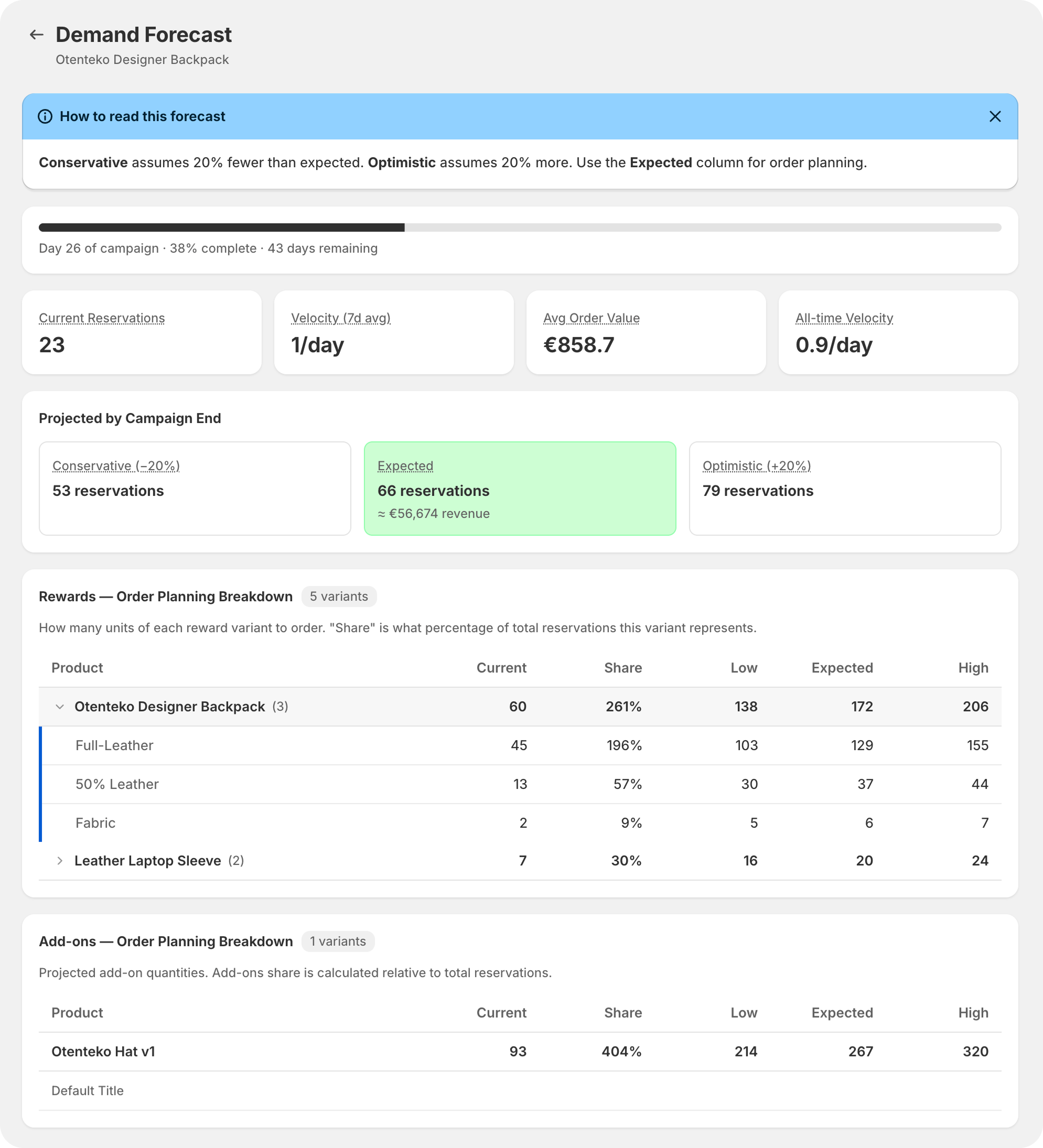
Stop guessing how many units to order. Fundlify now analyzes your campaign's real-time reservation and pre-order velocity to project exactly how many units you'll need — broken down by every product variant and add-on.
What you get:
• Smart Order Planning — See projected unit counts for every reward variant and add-on, so you know exactly what to order from your supplier, manufacturer, or white-label partner.
• Three Forecast Scenarios — Conservative (−20%), Expected, and Optimistic (+20%) projections help you plan for the best and worst case. Never over-order or under-order again.
• Revenue Projections — See projected revenue alongside unit counts to help with budgeting and cash flow planning.
• Real-Time Velocity Tracking — Understand your daily reservation pace with both 7-day and all-time velocity metrics.
• Per-Variant Breakdown — Drill into each product to see exactly which sizes, colors, or options are driving demand.
How to access it:
Open any active campaign → click "Demand Forecast" in the top action bar. Available on the Growth and Scale plans.
This feature works in both the Pre-Launch (reservations) and Pre-Order (orders) phases, giving you a full picture at every stage of your campaign.
March 15
2026
⚡ 3x Faster Draft Order Generation
⚡ 3x Faster Draft Order Generation
⚡ 3x Faster Draft Order Generation
Generating draft orders is now up to 3 times faster. We've completely rebuilt our processing engine to handle multiple orders simultaneously.
- Before: 5 orders took ~30 seconds
- Now: 5 orders in ~10 seconds
Whether you're processing 5 or 100+ orders, you'll see a significant speed improvement — all with a smooth progress bar so you always know what's happening.
✉️ Email Verification for Pre-Orders
A brand-new email verification system to protect your campaigns from fake or duplicate orders:
- Customers receive a verification email after placing a pre-order
- One-click verification confirms their email is real
- A beautiful on-page confirmation popup appears when they verify — so they know it worked
- Verified and Unverified badges appear on your order list
- Suspicious orders (duplicates from the same email) are automatically flagged
- Fully customizable email templates — match your brand's look and feel
This helps you launch with confidence, knowing your backer list is genuine.
🛡️ Smarter Order Processing
We've improved how Fundlify matches products to orders behind the scenes:
- Orders now use intelligent product matching — even if a product was re-added to a campaign, existing orders will still process correctly
- Failed orders are now isolated — one problematic order won't block the rest of your batch
- Better error messages tell you exactly what went wrong and which order was affected
📧 Improved Email Templates
- Store address and contact details now appear correctly in all email footers
- Cleaner email design with improved layout consistency
- All notification email templates (verification, confirmation, tracking) share a unified, professional look
💰 Updated Billing for Draft Orders
We've made our draft order billing simpler and fairer.
Before: A flat $2 fee per draft order was charged upfront when you generated draft orders — regardless of whether your customer ended up paying.
Now: Draft orders follow the same percentage-based pricing as your plan's platform fee, applied to the total order value when drafts are generated.
| Plan | Platform Fee |
|---|---|
| Starter | 5% |
| Growth | 4% |
| Scale | 3% |
| Enterprise | 2% |
What this means for you:
- One consistent pricing model — the same percentage applies whether customers check out directly or through draft order invoices
- Transparent and proportional — the fee scales with order value, no more flat charges on small orders
- Displayed before you confirm — you'll see the exact fee amount before generating drafts, so there are no surprises
March 14
2026
⚡ Faster Loading Speeds
⚡ Faster Loading Speeds
⚡ Faster Loading Speeds
We've optimized how your campaign pages load. The campaign editor and campaigns list now load significantly faster — up to 2x quicker than before. Less waiting, more creating.
🛡️ Smarter Sold-Out Handling
When a reward variant sells out completely (all inventory reserved or ordered), it's now automatically hidden from your campaign. No more confusing error messages when trying to save — the app handles it seamlessly for you.
📱 Improved Mobile Experience
The Help Center button no longer overlaps with content when viewing modals or panels on smaller screens.
🎨 Better Error Messages
- Error messages now appear in red and stay visible until you dismiss them — no more missing important alerts
- Errors are shown right next to the field that needs attention, so you know exactly what to fix
- Pricing issues inside reward variants now show a clear notification on the reward card itself
✅ Easier Setup
After activating the Fundlify theme extension, you'll now see a success confirmation banner on your dashboard — so you know everything is set up correctly.
🧹 Cleaner Dashboard
- The promotional card on your dashboard can now be dismissed with a simple close button
- The app name displays cleanly without getting cut off in the Shopify navigation
💾 Save Bar Integration
All forms that require saving now use Shopify's built-in contextual save bar — giving you a consistent, familiar experience with clear Save and Discard options.
March 6
2026
Image Resizing & Alignment in Campaign Editor
Image Resizing & Alignment in Campaign Editor
Image Resizing & Alignment in Campaign Editor
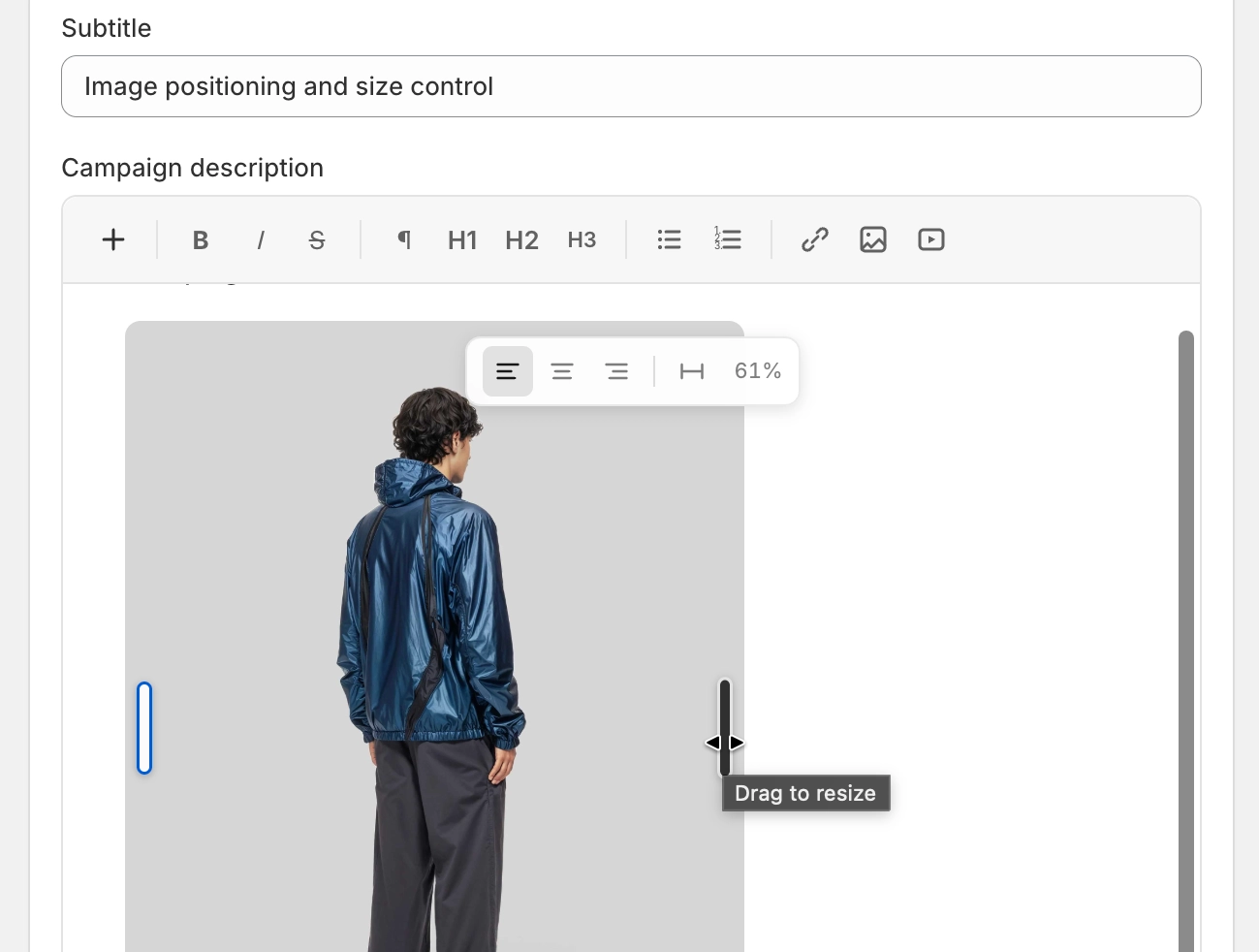
You now have full control over the visual presentation of images within your campaign descriptions!
What you can do:
- Resize Visually: Simply click on any image inserted into the editor and use the drag handles to fluidly resize it to the exact width you want.
- Align Precisely: Hover over any image to reveal the alignment toolbar. In one click, you can snap the image to the Left, Center, or Right of the text area.
- Full Width: A dedicated "Full Width" button instantly expands the image to fill 100% of the available space.
- Theme Protected: The sizes and alignments you choose are strictly isolated from the merchant's Shopify theme. The styles are locked into the specific image element, guaranteeing your layout looks exactly the same on the live campaign page as it does in the editor.
March 1
2026
Campaign Updates (Merchant Announcements)
Campaign Updates (Merchant Announcements)
Campaign Updates (Merchant Announcements)
Keep your backers informed and engaged with Campaign Updates — a new way to post announcements directly on your campaign page.
What's New
- Post updates from the campaign editor — Write rich-text announcements with bold formatting and bullet lists, right from the Campaign Updates section in your campaign settings.
- Publish or hide updates — Toggle visibility of any update without deleting it. Only published updates appear on the campaign page.
- Pin important updates — Pin one or more updates to always show them at the top of your campaign page. Pinned updates are sorted by newest first.
- Real-time storefront sync — Updates appear on the campaign page within seconds of publishing — no page reload or campaign save required. Deleting an update removes it from the storefront just as quickly.
- Fully translatable — The "Campaign Updates" section title is part of the translation system. Customize it per language via the Translations page in the super admin.
Feb 27
2026
🚀 Campaign Management
🚀 Campaign Management
🚀 Campaign Management
New Features
- Flexible end date & time — Set exact end dates and times for both pre-order and pre-launch phases using date and time pickers
- Location selection per campaign — Assign fulfillment locations for each campaign individually
- Reorganized campaign goals — Numbered phases, info banners, and visual separators for clearer goal setup
- Auto-end on goal reached — Draft order campaigns can automatically close when the funding goal is hit
- Automated campaign transitions — Campaigns automatically transition between phases (pre-launch → paused, pre-order → completed) at their scheduled end times using Cloud Tasks
- Purchase limits — Set per-product purchase limits to control how many units each customer can order
- Real-time inventory validation — Server-side stock checks during checkout prevent overselling
Improvements
- Campaign stats now recalculate from actual data instead of resetting — filters out deleted campaigns and self-heals any offsets
- Campaign end-phase detection is faster and more reliable — checks every 10 seconds with an immediate check on mount
- Only paid orders count towards campaign goals — abandoned checkouts no longer inflate progress
Bug Fixes
- Fixed campaign end dates recalculating correctly when duration changes
- Fixed image upload timing during campaign creation
- Fixed validation rules that were blocking valid campaign saves
- Fixed add-on variant toggling and "Apply to All" behavior
🎨 Design Studio & Storefront
New Features
- Design Studio — Customize your campaign page appearance with a visual editor — adjust colors, fonts, layout, and styles without code
- Shadow DOM isolation — Storefront components are fully isolated from merchant theme styles to prevent visual conflicts
- Clean section-based architecture — Campaign pages use a modern Liquid section layout for reliability across themes
Improvements
- Branded loading animation for campaign pages
- Responsive reward images (3:2 aspect ratio) with cleaner card layouts
- Campaign page cleanup and responsive layout improvements
Bug Fixes
- Fixed styling sync between Shadow DOM and storefront components
- Fixed scroll behavior and modal rendering inside isolated components
📧 Email & Notifications
New Features
- Custom notifications — Send custom emails to pre-launch and pre-order customers using a rich text editor with dynamic variables and live preview
- Custom footer text — Add personalized footer text to all email templates
- Store address toggle — Show or hide your store name, legal business name, and address in email footers
- Real store details — Emails automatically use your real store name and address from Shopify
Improvements
- All email templates share a consistent core design
- Campaign images use a unified 19:6 aspect ratio across all emails
- Direct checkout confirmation emails now use the core template as a reliable fallback
Bug Fixes
- Fixed reservation email saving and added automatic campaign selection
- Fixed notification page layout and styling issues
💳 Billing & Plans
New Features
- Platform fees — Usage-based platform fees for direct checkout pre-orders
- FREE plan with billing — Free plan properly integrates with Shopify billing and usage fees
Bug Fixes
- Fixed Free plan to require proper Shopify billing — prevents compliance issues
- Fixed billing return URL to use the correct app handle
📦 Orders & Data
New Features
- Shopify Selling Plans — Pre-orders now use Shopify's native selling plan system for full compliance
- Full backer details after export — Backer names and emails are fully visible after order billing and export
- Export billing control — Orders must have drafts generated before export; charges apply per unprocessed reservation
- Daily stats tracking — Orders and revenue tracked per day for timeline charts and analytics
Improvements
- Draft order management improvements — updated IDs after regeneration, selectable draft orders, sticky table headers
- Campaign stats calculated from actual orders (direct checkout: paid only; draft orders: all orders)
- Unified backer name/email masking with automatic reveal after draft order generation
Bug Fixes
- Migrated legacy database queries to a powerful database architecture — resolved orders page errors
- Fixed reward count and quantity bugs across all checkout flows
- Fixed shipping date display — now shows month and year only
- Fixed missing fields (company, country code, state code) in shipping address validation
🔒 Security & Compliance
New Features
- GDPR compliance — Proper GDPR webhook handlers for data request, erasure, and shop redaction
Improvements
- Currency fallback and theme detection for fresh app installs
- Compliance webhooks properly registered and verified
🌍 Multi-Language Support
New Features
- Global translations — Manage translation packs for 40+ languages from a central admin panel
- RTL language support — Right-to-left languages are fully supported
📢 Announcement System
New Features
- In-app announcements — Broadcast announcements to all merchants or target specific stores
- Audio announcements — Record or upload audio messages for announcements
- Read/dismiss tracking — Merchants can mark announcements as read or dismiss them; unread count shown in dashboard
- Targeted broadcasting — Send announcements to all stores or select specific shops
✨ UI & UX
Improvements
- Polaris-styled orders page with improved layout
- Add-on image cropping with edge-to-edge 1:1 selection
- Removed unnecessary "days left" text from campaign list
- Branded Fundlify loader on campaign pages
- Webhook processing moved to background queues for faster response times
Feb 15
2026
Email & Notifications
Email & Notifications
Email & Notifications
New Features
- Custom notification system — Merchants can compose and send custom emails to pre-launch and pre-order customers with a rich text editor, dynamic variables, and live preview
- Custom footer text — Added editable footer text field to all email templates
- Include address toggle — Checkbox to show/hide store address (including store name and legal business name) in email footers
- Real store details — Email footers now pull real store name, legal business name, and address from Shopify instead of placeholders
Improvements
- Centralized all email templates to use core templates
- Unified email campaign image to 19:6 aspect ratio
- Used core template as fallback for direct checkout confirmation email
Bug Fixes
- Fixed reservation email — fixed template save persistence, added campaign auto-selection
- Fixed notification page improvements (layout, styling, functionality)
Campaign Management
New Features
- Flexible end date/time pickers — Replaced fixed duration dropdowns with date+time pickers for both pre-order and pre-launch phases
- Campaign-level location selection — Merchants can assign locations per campaign
- Reorganized Campaign Goals — Numbered phases, info banners, and dotted separators for clearer goal visualization
- Auto-end on goal reached — Draft order campaigns now auto-end when their funding goal is reached
Improvements
- Fixed total orders/funds stats — recalculates instead of resetting, filters deleted campaigns, self-healing offset
- Campaign end-phase detection improvements — reset polling state on status change, reduced interval to 10s, added immediate check on mount
- Renamed campaign routes to match Shopify nav menu
startsWithmatcher - Separated Dashboard path from home link to fix nav menu highlighting
Bug Fixes
- Fixed campaign end date system — recalculate
endDateon duration change with fallback mechanism - Fixed image upload timing during campaign creation
- Fixed
templateIdnot being set during new campaign creation - Fixed campaign save validation to remove broken validation rules
- Fixed add-on variant validation — allow toggling OFF variants with 0 quantity, "Apply to All" now copies
activeflag
Jan 8
2026
New Feature: Boost Your Campaign with Optional Add-ons
New Feature: Boost Your Campaign with Optional Add-ons
New Feature: Boost Your Campaign with Optional Add-ons
We are thrilled to announce a powerful new addition to the Fundlify Crowdfunding toolkit: Optional Add-ons. This feature is designed to help you maximize your funding and give your backers more of what they love.
Whether it’s a matching accessory, an exclusive upgrade, or a "thank you" gift, you can now offer extra items that backers can add to their pledge seamlessly during the checkout process.
Why Add-ons are a Game Changer
Historically, crowdfunding creators had to create complex reward tiers (e.g., "Backpack," "Backpack + Hat," "Backpack + Sleeve") to offer multiple items. This cluttered the campaign page and made it difficult to track specific item demand.
Optional Add-ons solve this by:
- Increasing Average Order Value (AOV): Allow backers to spend more on your campaign by picking up high-margin extras.
- Cleaning Up Your Rewards: Keep your main reward tiers focused on your core products while moving accessories to the add-on section.
- Real-Time Demand Mapping: Our system tracks add-on selections alongside core rewards, giving you an exact count for manufacturing and fulfillment.
Data-Driven Pre-Launching
One of the most unique aspects of Fundlify's Add-ons is their integration into the pre-launch phase. Most platforms only let you upsell during the live campaign. With Fundlify, you can:
- Gauge interest for specific add-ons before you even go live.
- Understand the "attachment rate" (e.g., "For every 10 backpacks reserved, 4 people also want a hat").
- Validate your product roadmap with actual reservation data, reducing the risk of over-ordering inventory.
Key Features Extracted from the Editor
Based on our latest update, here is what you can do inside the campaign editor:
- Granular Reward Association: You can link specific add-ons to specific rewards. If an add-on only makes sense for one tier, you can toggle that connection in the Reward Details settings.
- Customizable "Add-on Details": Upload high-quality imagery, write unique descriptions, and set an Estimated Shipping Date specifically for that item.
- Flexible Pricing & Quantity: Set a "Pre-launch reward price" vs. "Retail price" and limit the Purchase Quantity per Customer to maintain exclusivity.
- Inventory Control: Set the Pre-Order available quantity to ensure you never oversell what you can produce.
- Sync with Shopify: With one click, you can set the original product to "Draft" or duplicate products directly into your Shopify store for post-campaign management.
Summary
The Add-ons feature transforms Fundlify from a simple reservation tool into a comprehensive campaign management engine. By allowing backers to customize their pledges during both the pre-launch and pre-order phases, you get a clearer picture of your production needs and a significant boost to your total funds raised.
Ready to supercharge your campaign? Head over to your Campaign Editor, scroll to the Campaign Rewards section, and click "Add-ons" to start building your upsell strategy today!
No releases match .
Ready to launch your next drop on Shopify?
Install free to explore every update inside your Shopify Admin—with $0 pre-launch waitlists, crowdfunding, and built-in affiliates.